Thursday, January 16, 2025

Pirate quote, "I shall let you live another day"

OK, so this is such a random post. This morning I made coffee for my wife and she quiped, "I shall let you live another day", and I was like: "What is that quote from?" She wasn't aware that she was quoting anything, just thought it was a common joke. But I knew it from some story with a pirate, where he teases his young assistant each night.

I tried searching for that quote but my Google-fu was not strong enough. I thought maybe it was from Treasure Island; nope. I also noticed that Google search kept offering to auto-fill with essentially the same search, i.e., I was not the first person to try to identify this quote.

Finally, I realized that the actual quote was probably different, so I started experimenting with rewording it (also using shorter 'sections'). I finally hit paydirt with, "probably kill you tomorrow."


It's from The Princess Bride!

Westley tells Buttercup that he was apprenticed to the (previous) Dread Pirate Roberts, who told him each night: 

"Good night, Westley. Good work. Sleep well. I'll most likely kill you in the morning."


So, hopefully, if anyone else is search for 'that' quote, Google will now find this post -- saving you the headache!

Thursday, July 11, 2024

Carry-on luggage with large wheels

This is kinda a silly post; I tried to ask for help with this on Reddit but "something went wrong with your post" and I could never get it to work. Then, after extended searching, I answered my own question. So in case anyone else is looking for this, I am posting my research here in blog form:

2-wheels vs 4-wheels

Many years ago I had the unfortunate experience of my spinner luggage's small wheels breaking mid-trip. I had to carry it for the rest of my vacation. Ever since then I have tried to only buy luggage with larger wheels, e.g. 3", which I assume are more reliable. Some might debate that assumption but I reason that physically-bigger wheels are stronger (less like to collapse), also the larger diameter means the hub rotates slower (less wear on the bearings). And, larger wheels are better on uneven surfaces. 

The only way to get bigger wheels is to buy 2-wheel luggage, i.e., not the more-popular 4-wheel 'spinner' design. Unfortunately, as I look for new luggage today, most of the 2-wheel carry-on's appear to have the same small 2" wheels as the spinner bags. For instance, the Travelpro MaxLite5 has 2" wheels (their online chat quoted "50mm").

My research

Most listings do not list the wheel size, instead they just assure you, "high-performance wheels, they're sooo good." Also I could not find any way to search for "luggage 2-wheel large wheels." Instead I kept reading reviews of recommended luggage, then checked-out the recommended 2-wheelers. In doing so, I found the following 2-wheel bags with large wheels:


Osprey Daylite Wheeled Duffel


Osprey Ozone 40L


Yeti Crossroads 35L

  • $350
  • https://www.yeti.com/bags/luggage/26010000236.html
  • This is also for-sale on Amazon but not at any discount
  • 22 inch height, 35 liter capacity
  • this is a hybrid, i.e., the back-side is hard-shell 
  • 7.5 lb, heavy!
  • I couldn't find the wheel size but you can see that they're large, at least 3 inch
  • for some reason, they only provide a 3-year warranty. Maybe they assume people buying such a 'rugged' bag will subject it to hard travel?
  • in the Amazon comments, one reviewer complained that the zippers are waterproof -- but this also makes them difficult to use.


 TopoDesigns Global Traveler ROLLER


 Samsonite Armage II


Traveler's Choice Conventional II

  • $125
  • https://www.amazon.com/dp/B00GCBW8LU/
  • 21 inch height (I couldn't find the capacity)
  • 3.25 inch wheels
  • 8.6 lb, heavy
  • is this model discontinued? I couldn't find it on the manufacturer's web-site. They only make 4-wheel spinners now.
  • Even though this seems like a good choice, I am reluctant to pay so much for an off-brand's old model. Maybe if it was closer to $50!
  • also, the Amazon comments say the zipper breaks, as do the wheels, doh


Final Comments

 I have previously purchased these other 'large-wheel' 2-wheel bags:

  • Travel Pro 22 and 28-in rollers
    • I'm not sure which models these are, though they look like the MaxLite?
    • 3.0 inch wheels
  • Travel Select 22-in carry-on
    • $45 !!
    • 2.5 inch wheels
    • this was ultra-cheap and generally works fine. But after just 3 trips the top handle ripped.

Friday, February 2, 2024

How to remove a trash can lid

 (Wow, it's been 3 years since my last post? My, how time flies ... )

My local trash-collection service provides free replacement lids for our trash and recycle bins. But those lids are a PITA to remove and there's no advice or how-to's for removing them. I finally figured it out, though, and so now I am posting this quick explanation.

GENERAL INFO

  • First, you need to check the serial number of your trash/recycle bin to see if it's still under-warranty. At least where I live, that's 10 years. There should be a reference list on your trash service's web-site identifying which serials are still supported.
  • Also, worst case, you can always just throw the entire bin in your van or truck and drive down to the trash service's office -- and they'll figure it all out for you. If it's not under-warranty then they might require that you purchase a new one. Again, where I live, the recycle bins are always a free replacement, even if they're out-of-warranty

INSTRUCTIONS

  • The lids are held-on by 2 really-strong plastic pins. Those pins have 2 slots cut in the side to allow the pin to 'squeeze in' just enough to click into place. The key to removing them is to grab onto those slots and yank the pin out. (Which is easier said than done.)
  • First, use your fingers or a screwdriver etc to pull the pin out as far as possible. This is only about half-inch but that's enough to expose the slots.
  • Second, find a screwdriver that is small enough to fit through the slots. (It needs to be long enough and strong enough, too, i.e., you can't use a small screwdriver!)
  • Third, jam the screwdriver all the way through the pin and the slots.
  • Finally, twist the screwdriver around until the tip is braced against the side of the trash bin. This is to give you more leverage. Now, just yank the thing out!

This was -- by far -- the easiest way to remove these pins. I originally made the mistake of trying to wedge the pin out using just the tip of the screwdriver and only 1 side/slot. I also tried an assortment of pliers but nothing could grip it well enough.

FYI - here's another picture which shows the pin after I pulled it out 🙂 You can clearly see the slot and how I was able to jam the screwdriver through.


Wednesday, February 24, 2021

Gear 360 (2016) firmware updates


The two Samsung Gear 360 models (SM-C200 in 2016, then SM-R210 in 2017) are now discontinued. So I don't think you can download firmware updates for them anymore.

I own the older 2016 model and I was trying to figure-out if it had the latest/final firmware. This is what I found:

Aug 2017 = C200GLU0AQF1 

March 2018 = C200GLU0AQK

So, I think the "K1" firmware is the final release for the SM-C200 model


Saturday, May 2, 2020

SOLVED: Windows 10 mic input not working

I hope that this post rises in the search-engine results because I spent days trying to fix this issue, then found the solution through careful experimentation.

MY PROBLEM

My family and I are stuck sheltering in-place because of coronavirus and my kids are all attending online classes. So I had to dig-out several old HP desktop computers, and the first thing I did was refresh them with the latest Windows 10 '1909' operating-system. Everything seemed to work great.

Then we started to have issues where everyone was trying to participate in video-conferences at the same time (and in the same room) so I bought everyone corded headsets. But the microphones wouldn't work! I swapped headsets around, even tried my known-good headset from my work, so I knew the issue wasn't the headsets -- it was the computers.

NOTE: these computers used the old-style pair of Headphone vs Mic inputs, i.e., it did not use the newer combined input (like for smartphones). I'm not sure if this made a different to my eventual solution but it did help me to troubleshoot.

HOW I TROUBLESHOT

First I opened the Device Manager and saw that Win10 had installed (2) sound/video drivers:

  • High Definition Audio Device
  • IDT HD Audio

The IDT driver was dated 2015 so I tried the 'Check For Updates' function, but it reported that it was already the latest version.

Next,  I opened the Win10 'Sound' settings. I noticed that when I plugged/unplugged either the headset or the mic plug, the list of available Output or Input devices would auto-update. So this told me that the IDT driver was correctly detecting the presence of the plug; this was a good sign!

MY SOLUTION / EXPLANATION

I eventually realized that the new Input (that appeared in response to plugging-in the mic) was labeled "Line In" rather than "Mic In". If the driver thought I had attached a line-level device, e.g. an external CD player, then it wouldn't apply the necessary amplification for a very low-level device like a microphone. Something was interfering with the IDT's ability to fully detect the status of the mic input-plug...

So I tried disabling first the MS-provided "High Definition Audio Device" device. Everything still worked but the mic still failed to be detected correctly. At the very least, this demonstrated that the 2 drivers were redundant. Next I tried disabling the IDT and re-enabling the MS; now the mic plugin wasn't detected.

Finally, I disabled both audio devices -- then re-enabling only the IDT driver. It worked! In the Sound settings the new Input was labeled "Mic In" and the headset mic now worked. So, apparently, when the IDT driver starts-up, it is blocked somehow by the presence of the default MS audio-driver.


Wednesday, July 3, 2019

Could the 'Upside Down' be real?

In honor of tonight's release of Stranger Things season 3, I present the following argument in favor of the existence of the 'Upside Down'. Not like in the TV show, of course! The title of this post is just click-bait :-)

But in all seriousness, and apropos of nothing, I have been thinking about the difference in Einstein's famous equation for energy, e=mc^2, and how it differs from other similar physics equations. (Actually, I think this whole chain of thought began with a wistful memory of how much math I learned in college, including the derivation of e=mc^2... oh, well!)

THE PROBLEM

There are many examples of math and physics equations of the form:
  'TOTAL'  =  one-half-of-something  (multipled-by)  something-else-squared

For instance, kinetic energy = one-half MASS x VELOCITY-squared

So why does Einstein's energy equation = ALL-OF-MASS x light-velocity-squared?

THE SOLUTION

My conclusion: the MASS we can measure is only HALF the actual mass. In other words, there's another entire 'mirror' universe equal in size to our visible universe. We just don't know how to access it...
__________

This conclusion is actually supported (maybe...) by the current models of a Grand Unified Theory (GUT) of physics which predict multiple additional dimensions  -- though I think they predict that those dimensions are extremely extremely small. I'm reminded of the classic novel, "Flatland", which discussed the idea of how our 3-dimensional world would appear to someone accustomed to a 2-dimensional world. You could 'pick up' that 2D person and they would 'disappear' from their world, even though they were still entirely intact and whole. Then, you could return them to another spot in their world and it would appear as if they'd transported. If we could demonstrate and control our position in one of these hypothetical extra GUT dimensions, we could effectively do the same thing in real life.

Another cool idea: if we could understand what causes gravity in the same way that we now understand magnetism, we could build our own artificial gravity-generators. This would make space travel much easier since we wouldn't need rockets, instead we would just generate 'reverse' gravity and we'd be launched into orbit by our centripetal motion!

P.S. Don't quote me, I don't really know what I'm talking about ;-) In fact, the 'one-half' in kinetic energy comes from the fact that we're integrating (adding-up) the energy required to accelerate something from zero to some-velocity, and if you graph that it looks like a right-triangle where the area is HALF the height (x) width.

Saturday, September 16, 2017

What happened to Salon app

Problems with accessing Salon.com 

The title of this post is copied from the auto-complete offer from Google search, when I was trying to find out what happened to the Android app for Salon.com.  It had not been updated since 2015 (two years ago) and apparently I was fortunate that it still worked, at all, on my Galaxy S7 running Android 7.0 "Nougat".  Most of the reviews in the Google Play Store said that it didn't work on Android 7.0.

But now it seems to have stopped working for everyone and has been removed from the Play Store search.

When you use the above-mentioned search term you are directed to the Salon.com web-site where they still extol the virtues of their (non-existent) Android app.  They also still include the link to the original app -- so the app is still available, but it's highly questionable if it still works
https://play.google.com/store/apps/details?id=com.salon.salonapp

Probably they want people to use the mobile-optimized version of their web-site instead. Unfortunately, the site has a ridiculous amount of popup ads, making it very unpleasant to use.
So I wanted to post the following workaround:

The Play Newsstand app is free and skips all the ads.  The only limitation is that you can only browse the most recent posts, maybe a days' worth.

What Happened to Salon.com?

I have been a regular reader of Salon.com since they began 20 years ago.  I was even a subscriber, back when they tried to use that profit model.  But now they seem to be on the decline.  On their own site, under Press Releases, they admit that they are losing money and that their viewership has dropped 25% in the past year, 2016-to-2017.  
I also found the following articles, talking about the decline of the site:

In Conclusion

If I ever see an official announcement about the app, I'll update this post.

Sunday, August 28, 2016

How to remove the armrest on a 2015 Honda Accord (9th generation)

Quick post without any pics; my phone is sooo far away (in the next room).

I just wrestled with my 2015 Accord's rear armrest and I was unable to find any information online about how to remove it, so now I'm posting the secret :-)

On the right-side of the armrest there is a plastic spacer.  This is easy to find and remove, and implies that you should now be able to push the armrest 'in' on the right to unclip the opposite side.  But it wouldn't move.  Eventually I figured-out that you have to pull back the carpeting around the left side and then you'll see a spring-loaded clip holding the left-side in place, too.  Pinch to remove and now the assembly can be pushed out, to the right.

It also looked like there was a bolt on the left side and I took a wrench to it, shattering the plastic.  I don't think it needed to come off, the assembly was just stuck.  But, by then, I was impatient :-)

Saturday, May 21, 2016

Review of Yamaha MusicCast WX-030 for DLNA playback

ABOUT MY DLNA COLLECTION

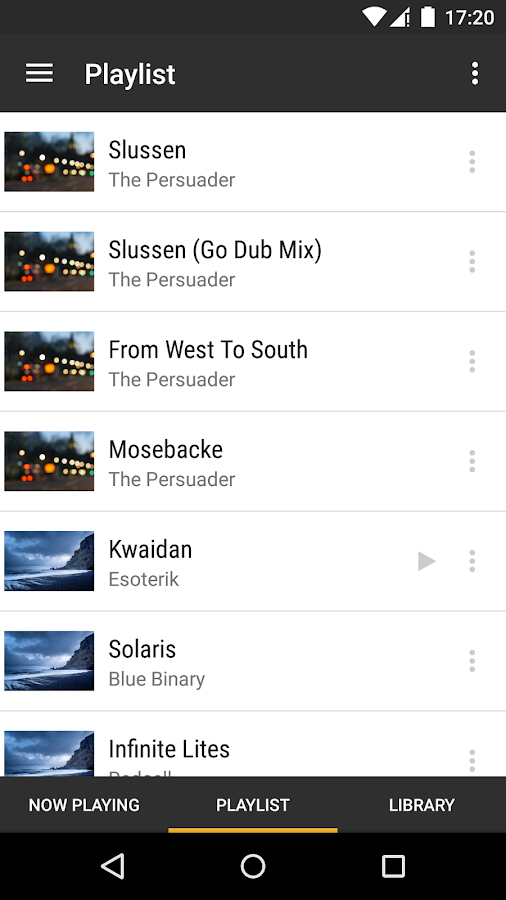
I have a large library of music on my home computer which I share throughout the house via J River Media Center and its DLNA service.  I also use the BubbleUPnP app on my Android phone and tablets to act as the front-end, to select songs and direct the playback to either the local device (typically bluetooth headphones) or my family-room stereo.

Over the years I have gone through multiple AV receivers from Denon, Sony and now Yamaha.  They generally work alright but both the Denon and Yamaha receivers tend to freak-out if I skip a song, i.e., they corrupt the playback and need to be power-cycled.  Also, the playback is restricted to one room -- albeit the most important room.  But I still hoped to find a solution for music listening in the kitchen and other rooms.

MY SEARCH FOR DLNA SPEAKERS

About six months ago I started a thread on the AVS Forum asking for input about DLNA playback on all the available network speakers, e.g.
  • Sonos
  • Denon Heos (Play-Fi)
  • Paradigm
  • Samsung
  • BlueSound
  • Definitive (Play-Fi)
  • LG MusicFlow
  • Polk Omni (Play-Fi)
  • Martin Logan Crescendo
Unfortunately, none of them seemed like a perfect match for my needs. The Play-Fi based models could act as DLNA 'Renderers' at least, but they were very expensive.  I had been prepared to pay a lot for high-quality sound but then, for instance, the Definitive floor-models (at Best Buy) had broken buttons so I worried about their design.

NEW YAMAHA SPEAKER

Now I have a new toy -- the Yamaha MusicCast WX-030 network speaker.  It's very affordable @ $250.  It has its own MusicCast app which allows you to playback from various streaming audio services like Pandora or Spotify, but I've yet to commit to any of those. It also lets you playback from 'Server' (DLNA) but then its track/playlist control is non-existent.  Fortunately the speaker also works perfectly with BubbleUPnP.  Probably the most important feature of the app is that it allows you to EQ the speaker as well as couples two speakers into a stereo pair.
BubbleUPnP playlist

DLNA Playback

When the speaker is asleep, I can initiate power-on and playback entirely from BubbleUPnP.  I can also control the volume.  And I specifically tested the EQ -- the settings I chose from the MusicCast app are saved by the speaker, they're not dependent on using that app.  So once I 'fixed' the EQ I never need to use their app again, I can rely exclusively on BubbleUPnP.

HOW DOES IT SOUND?

well... You get what you pay for?  It sounds alright, good enough that I'm not going to return it.  But its definitely a small speaker without any deep bass, also the EQ seems to change based on volume.  At low volumes the speaker sounds muffled, enough so that I boosted the high-band in the EQ.  The bass sounds better at high volumes, probably because of the relative-loudness phenomenon.  I also dialed-back the mid-band because the speaker seemed 'shouty'.

In conclusion, I am happy with the speaker.  Maybe 3 out of 4 stars?  I plan on buying a second unit and pairing them together for stereo.  That can't help but fill the room with sound, and hopefully it will improve the bass performance, too.

UPDATE: August 2016

I still rate it 3 of 4 stars.  I bought a second unit and set up stereo-pairing but it quickly had problems. If the system had been 'asleep' and I woke it up from either the MusicCast app or BubbleUPnP (DLNA), the two speakers would be horribly out-of-sync.  The right/master speaker would play normally but the left/slave speaker would stop and start.

I contacted Yamaha tech-support and they insisted it was something wrong with my home network.  They showed me where to access the diagnostics screen and that identified the problem.  It is accessible in the MusicCast app under Settings > (speaker) > Information > Diagnostics.  From this screen I could see that the right speaker could 'see' 5 or 6 of my neighbors' wifi and the ping time sometimes jumped from 0.03 seconds to 4.5 seconds!  The left speaker didn't see any neighbors and its ping was consistently solid at 0.03 seconds.

So I installed a PowerLine ethernet adapter for the right speaker.  So far it works perfect, although time will tell.

UPDATE: October 2017

The playback has continued to be reliable since I bypassed wifi.  I continue to rate the system 3 of 4 stars, though.  They seem to release firmware updates every few months -- which I appreciate -- however, the updates always break the stereo-pairing.  Recreating it requires a special key sequence on each speaker, i.e., it can't be enabled through the software.  Also, there's a second key sequence which is needed to disable the default wifi mode, i.e., after each update the wired speaker defaults back to wifi.

Thursday, November 26, 2015

Fix for Sony HDR-CX430V video playback on Plex

CAMCORDER UPGRADE


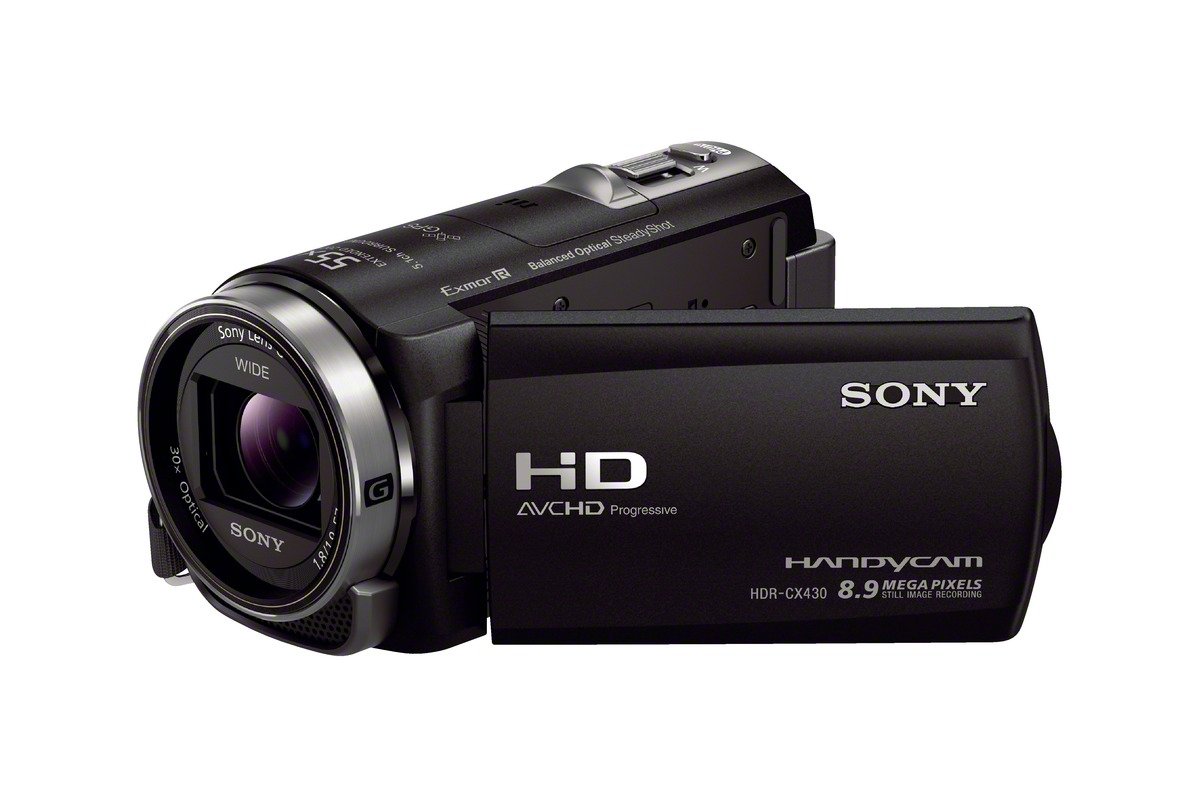
About a year ago I upgraded my old Sony CX7 camcorder to a new Sony HDR-CX430V model.  The old CX7 recorded in 1440x1080i and was having trouble focusing, while the new CX430 supported full 1080p @ 60fps and also included Sony's 'pro-level' Balanced Optical SteadyShot.

PROBLEMS WITH PLAYBACK


I have the Plex media-server app running on my home PC and serving-up all of my home videos, mostly from the old CX7 but also various smartphone videos etc.  I love Plex!  It rescued me from years of fussing with HTPC, XBMC, MPC-HC and on and on.  Now, I can simply load the Plex viewer on my Samsung smart TV and everything 'Just Works'.

Except that the new Sony recordings wouldn't play.  The issue turned-out to be the specifics of the h.264 video recordings.  The CX430 was recording 1080p @ 60fps with h.264 L4.2 encoding but the Samsung was only capable of decoding L4.0.  What's more, the Plex server was only able to transcode up to L4.1 (not confirmed but that's been my experience).  So all those new L4.2-encoded videos now need to re-encoded -- a lot of work since I've been using the camcorder for about a year now.

NEW RECORD SETTINGS


The long-term solution is to switch the record mode from 60p to 24p / Standard.  I found this option in the MENU under Image Quality > 60/MP4/Std > 24p > Standard.  A quick test reveals that the 24p recordings use L4.0 encoding.  And, finally, I confirmed that they playback correctly on my Plex/Samsung combination.
I don't think these encoding specs are listed in any of Sony's manuals.
__________________________________

Thursday, March 19, 2015

Review of the 'mystery' Samsung WB380F smart camera

MY NEW CAMERA

I just bought a new Samsung WB380F smart camera through Best Buy's online store.  It's a mid-level compact point-and-shoot that has wifi and online connectors for several online photo-sharing services.  I specifically wanted something that could link to my cell phone (when switched to hotspot mode) and directly backup photos and videos to Flickr.


That didn't work out so well.

ACCIDENTAL BETA TESTER

Apparently Best Buy listed the camera for-sale before it was supposed to be released?  That's the only explanation I can think of for the strange experience I've had with the camera.  In general, I like the camera and it definitely takes better photos than my Nexus 5 smartphone!  But there's no longer a Flickr app.  That was an included feature on the predecessor model, the Samsung WB350F, but apparently its been dropped.  I tried to find a list of supported services but the 350 is still the model listed on the Samsung U.S. web-site. In fact there's no mention of the 380, at all.  When I tried to google "samsung wb380f" all I found were references to camera stores in Germany where it had gone on-sale in January (two months ago).  I couldn't find any reviews or anything in English.

So I submitted a tech-support request through Samsung's web-site.  Their response was, "This is not a U.S. model."  Um, then why is it for-sale at Best Buy?  Why are all the buttons and manual in English?  I tried googling it again and now, just 2 days later, I see it listed on the Samsung Australia and Samsung UK web-sites.  What's more, the older 350 model is now sold-out on the U.S. web-site.  So clearly they're getting ready to switch models and I simply got ahold of one early.

ONLINE BACKUPS

Meanwhile, I had started experimenting with the remaining online services -- Picasa, Facebook, YouTube, and Dropbox.  Picasa is really Google Plus: Photos.  Dropbox won't let me login and I think the issue is that it doesn't recognize the 380 as a supported model.  (I didn't try Facebook or YouTube because I don't plan on sharing anything online; I just want a mobile backup in case I run out of storage or lose the phone.)  I called Samsung's phone support and they agreed that my issue needed to be escalated.

I tried using the built-in Picasa backup but I don't like the Google Photos web-site, e.g. I couldn't see any way to organize my unsorted photos.  You can either view the (already sorted) Albums, or you can View All which is a big mess.  (My phone has a built-in Google Photos backup but that was the same result as the camera's app.)

I tried using my phone's built-in Google Drive backup but then there's no 'photo awareness' of the files.

I also tried using the official Flickr app but it only backs-up photos you take with the phone, i.e., it ignores photos you copy from elsewhere.
_____________________

MY CURRENT BACKUP TECHNIQUE


  1. I installed Flickr Upload on my Nexus smartphone
  2. I installed Samsung Smart Camera app on my Nexus
  3. I take pictures/videos on the Wb380F
  4. Put the camera in 'wifi' mode, then select Mobile Link > Select Files From Phone
  5. Open the Samsung Smart Camera app on my phone
  6. tap the back of the phone to the 'NFC' label on the left-side of the camera
  7. on the phone, click Select All checkbox, then COPY
  8. The wireless copy is fast, e.g. 2-3 MB/second
  9. Flickr Upload sees the new files and immediately re-copies them 'up' to the cloud
Even though this is a two-step transfer I only need to select the photos/videos once (in the Samsung app).  Everything else is automatic.  And I like the Flickr site because it has multiple views you can select, e.g. the new Camera Roll sorts by date and makes it easy to Select All > Add To Album.

WIDE-ANGLE = FISH-EYE!


One thing I noticed is that the camera has a wide-angle lenses so everything looks far away.  If you try to fill the image by walking close to your subject, there's a 'fish-eye' effect.  Instead you need to use the 21x optical zoom.
______________________________________________________

Wednesday, May 14, 2014

Workaround to Acrobat 9 updates not working

Has it really been 6 months since my last post??  Here's a new Quick Note, as always.

My company still uses Adobe Acrobat 9 Standard but for the past month I've been unable to auto-update my new installs.  Whenever I've tried the built-in Help > Check For Updates it reports "No updates available."  I think I've now found the reason, as well as a workaround.

ROOT CAUSE?
The base install of Acrobat 9.0.0 includes their older updater which is located in C:\Program Files x86\Common\Adobe\Updater6.  Inside that folder there are two digital certs, e.g. AdobeUpdate.cer, which are dated 4/16/2008.  I suspect those certs just expired last month?

WORKAROUND
The workaround is to manually update Acrobat 9 until you get the newer AdobeARM updater which was included in Acrobat 9.2.0.  Worst case you'll need to manually download and install all the following updates:
9.1.0 > 9.1.1 > 9.1.2 > 9.1.3 > 9.2.0

The downloads are located on this Adobe page:
http://www.adobe.com/support/downloads/product.jsp?product=1&platform=Windows

There might be some shortcuts?  For instance, some online discussions say you can skip directly from 9.1.0 to 9.2.0.  Also, you might try copying the C:\Program Files x86\Common\Adobe\ARM folder from an updated PC to an un-updated, then run the AdobeARM.exe ?

Sunday, November 10, 2013

Custom ringtones on Nexus 5

I just got my new Nexus 5 through the Google Play Store.  In general it's a great phone!  My only complaint is that it has crashed on me twice -- once during the initial Google Play apps-sync, and again while using the USB 'Media' link to copy several GB  of MP3s onto the phone.

Some of those MP3s are custom ringtones that I'm accustomed to using for particular contacts, i.e., so that I can tell who is calling by the ringtone.  Unfortunately, I could not find any way to select a custom ringtone using any of the built-in menus or apps.  (In the past I've been able to use the built-in music player to set an MP3 as a ringtone but Google Play Music doesn't seem to have that.)

Ultimately what I did was install another file explorer (in this case "ES File Explorer" but I suspect any would work).  Now, when I go into the ringtone selector -- in either Settings > Sound or in the individual Contacts' ringtone -- there is a prompt to choose which file explorer.  If I use ES File Explorer I can then choose any MP3.

Monday, June 17, 2013

fix for Windows Update error 8024402F

I've just reinstalled my main home-office workstation and Windows Update started to fail after I installed Microsoft Office.  The specific error-code is 8024402F.

I tried all sorts of suggested fixes online:
- reboot (MANY times!)
- ran WindowsUpdateDiagnostics tool
- ran System File Checker (SFC)
- Reset the content of the Catroot2 folder
There were other more-involved fixes, too, but I wanted to avoid them if at all possible.  I mean- this was a brand-new install so how could any system files have gotten corrupted?  I hadn't had crashes or other errors before this point.

Solution

The key was that Windows Update was configured for both Windows and Microsoft app updates.  I went into 'Change Settings' and unchecked the option to update Microsoft apps -- i.e., Office -- and the problem went away.  Honestly, the only Microsoft app I have installed is Outlook 2003 so I'm not expecting any updates.  And, apparently, there's something about how Office 2003 registered itself that confused/broke that Microsoft Update feature.


Friday, April 5, 2013

Comparing Schlage vs Kwikset lockset handedness

I have a side door on my garage with a matched set of Kwikset handle and deadbolt but they lock/unlock in different directions.  This is a right-handed door and opens inward, i.e., from the outside the hinges are on the right, and from the inside the handles/bolts are on the right.  The deadbolt works the way I expect, as the top of the key (from the outside) and/or the top of the handle (on the inside) moves the same direction as the bolt.  The key to the handle, however, works the opposite direction.

Handedness of door locks

This is the 'handedness' of the lock.  Rather than left or right, it's defined as clockwise or counter-clockwise.  The seemingly-correct 'handedness' for my locks -- from the inside -- is clockwise to lock, counter-clockwise to unlock.  But the handle's twist-latch turns counter-clockwise to lock.  I set out to reverse this.  And failed.

What I learned about lock handedness

I found some locksmith discussion web-sites where other people had asked about this.  There was a lot of confused replies as most people thought the original poster was an idiot who couldn't figure-out how to remove and reverse the inside/outside orientation.  Eventually I learned the following:

  1. Some commercial locks are designed to have their handedness reversed but most residential locks are not.
  2. When you flip a deadbolt from left-open to right-open, the handedness reverses too since the door-open action is the lock.  But when you reverse the direction on a handle the door-open mechanism reverses but not the internal locking mechanism.
  3. Kwikset handles are all designed with a clockwise unlock. So in order for their handles and deadbolts to have the same handedness you need to use them on left-handed doors.
  4. Schlage handles are the opposite, they're designed with a counter-clockwise unlock.  So their handles and deadbolts only match when used on right-handed doors.

Conclusions/Recommendations

I went to Home Depot and inspected the lockset displays.  I also asked the employees in that department but they were unaware of this issue.  They said people usually just accepted the mismatched handedness.  Maybe now they'll ask customers which way their doors open and use that as a means of recommending one brand over another:

left-handed doors = Kwikset
right-handed doors = Schlage

Saturday, March 2, 2013

Translation of IKEA frukt soppa instructions

This is silly, I know, but I bought a packet of the Swedish fruit soup from IKEA then realized I couldn't read the directions.  So I tried googling it but without success.  Finally, I used Google Translate (which includes a virtual Swedish keyboard for the extra symbols) and the translation is as follows:

ORIGINAL FRUKTSOPPA DIRECTIONS

gör sÄ hÀr, vispa ner pÄsarnas innehÄll i 1 liter kallt vatten, en pÄse till 0,5 liter. Tillaga pÄ spis eller i mikrovÄgsugn. PÄ spis, Koka upp under omrörning. LÄt svalna, gÀrna i vattenbad och under lock. I mikrovÄgsugn, VÀrm pÄ hogsta effekt (600W) i 6 minuter. Rör om efter ca halva tiden.

TRANSLATED ENGLISH DIRECTIONS

Do this: whisk the bag's contents in 1 liter of cold water, (a bag to 0.5 liters). Cook on stove or in the microwave. On the stove, bring to boil, stirring. Allow to cool, preferably in water and under cover. In microwave, heat at maximum power (600W) for 6 minutes. Stir in about half the time.

Thursday, October 11, 2012

Problems with Pelco and Swann security-camera DVRs

OVERVIEW

My office has an established array of 8 security cameras but our DVR is now broken.  The old DVR was a Dedicated Micros DS2 and it never really worked as expected, but it was minimally sufficient so we put-up with it.  Now that it's died I was excited at the prospect of finally replacing it with something that worked exactly as we'd always wanted.  But I continue to run into a bewildering array of problems, none of which could have been predicted.

MY RESEARCH METHOD

I have now researched about 8 possible replacement DVRs.  In addition to reviewing their online product-pages, I downloaded all the brochures and I read all the manuals cover-to-cover, keeping detailed notes.  In this fashion I was able to immediately eliminate several DVRs because they did not allow you to limit users to individual cameras (just general access-levels, e.g. live-view versus playback).

I have also been testing the online demos, of which I was surprised to find so few?  This experience gave me a general 'feel' for the level of spit-and-polish on the UIs, which one would expect to reflect the overall quality of the product.  Some DVRs had a distinctly 1990s UI -- not a deal-breaker but it definitely gave me pause.

REVIEW OF PELCO

After much discussion, I was able to get an in-house demo of the DVR recommended by our security-system vendor -- the Pelco DX4808.  This is the current mid-range DVR by the same industry-leading company that made our 480-line analog cameras.  It featured full-resolution D1 recording capability across all 8 cameras simultaneously, which was the biggest failing of the old Dedicated Micros unit.  Unfortunately, we quickly ran into serious issues with the new unit.

1. The D1 recordings were not properly de-interlaced.  When people would move side-to-side in the camera view, there were major 'jaggies' around them.  And this issue extended to motionless images, too, i.e., the new '480-line' recordings looked worse than our old 240-line recordings (which skipped the whole de-interlacing issue by simply recording one set of NTSC video frames).  I asked several people at Pelco about this and none of them had any idea how to fix it; they confirmed that there was no hidden setting I could use to 'flip' the odd/even frames, nor was there a switch on the cameras to reverse how they were sending the image.

2. There were 3 different DVR interfaces available but none of them allowed you to easily review the recordings?  The 'old' DX Series application allowed you to search by camera and date/time, then presented you with a time-line indicating when the camera had been triggered.  But the timeline was awkward to use since most (short) recordings would show-up as a single pixel-wide 'event' and clicking anywhere nearby would result in the 'invisible' playback of other cameras rather than skipping ahead to the next event on the camera you had searched for.  There was also a newer DS Control application which allowed you to search but then played-back events without any timeline or listing, i.e., it was like you were randomly playing back events.

3. The remote viewing apps used an old Win95-style video interface.  This meant that you could not move the view screen to a 2nd monitor nor could you resize it.  Also it would force my Windows 7 computer to drop out of 'Aero' mode.  The new DS Control app seemed to work properly but the playback UI made it a deal-breaker for my boss.

4. Finally -- and this is really a weird stupid one -- I could not get the DVR to properly use the local-time.  It seemed stuck on GMT, no matter what I tried.  I think the issue was that the initial recordings were done when the unit was still fresh-out-of-the-box running on GMT and so it insisted on deferring to those time-stamps even though I'd switched the general configuration to PST.  I repeatedly asked Pelco if I should just reset the cache of recordings but they never responded, and I returned the demo before bothering to test it.

One good point:  I was able to successfully operate the Pelco DVR remotely across our Cisco VPN.  The old Dedicated Micros had apparently used a faux 'UDP' mode of transmission (TCP packets without the full handshake) which tripped-up our VPN and made playback almost unbearably slow.

CONSIDERATION OF 'OFF' BRANDS

From all my extensive research I had started to notice distinct similarities between some brand-name DVRs and comparable 'off-brand' models.  Clearly, some of these units were simply OEM versions of the same recorder!  For instance, the Pelco DX4800 was really just a rebranded LG LE5008-NH albeit with additional remote interfaces like DS Control.  But this made me realize that I should consider some of the smaller (cheaper) brands, too.

REVIEW OF SWANN

The local Fry's Electronics would frequently advertise security DVRs for a fraction of the cost of the 'real' DVRs I had been reviewing.  In the past, when I would try to test the products' online demos or read their manuals, it was clear that they were shoddy fly-by-night units, totally unfit for a business environment.  But then I saw the brand-new 'top-of-the-line' Swann DVR8-4000.  It featured full D1 recording across all 8 channels as well as a well-reviewed mobile app.  And it only cost $400 -- a third what the Pelco would have cost!  So I purchased a unit, with the expectation that I could return it within 30 days if it wasn't All That.

At first it seemed a roaring success.  Out of the box it appeared to be a very well built and professional unit.  The default settings were all totally appropriate so I didn't even have to change anything to suit our desired recording-mode, i.e., only motion-activated and always max quality (D1 and 30 fps).  And the live-playback was properly de-interlaced -- finally, true 480-line resolution!

Unfortunately it went badly south from there:

1. First, I ran into weird UI issues where I would think I had saved a setting (because I'd clicked OK afterwards) only to learn that the unit only saved some changes if you clicked OK, then APPLY, then confirmed OK again.

2. Next, I created a new user-account and assigned it access to just 1 camera; this was one of the primary requirements which the old Dedicated Micros was unable to perform.  Unfortunately, the remote viewer would either show ALL the cameras (ignoring the configuration) or NONE.  I called Swann tech support and they eventually admitted that these were known issues, to be fixed in a 'future' firmware upgrade -- no ETA.

3. They also asked me if I was able to playback the recordings; I could not!  Apparently this was another known bug.

4. Since I only had 30 days with which to test, I escalated my issues to the senior tech support and asked if I could beta-test the next firmware.  They were very helpful and obliged me, sending me the file which was very easy to install ... and rendered the unit completely inoperable.  Now the tech support people offered to send me a replacement unit, but I declined that in favor of simply returning the unit to Fry's for a refund.

CONCLUSION

So here I sit, sans security recordings.  Of course, the cameras are still serving their primary 'deterrent' role since people don't know they're inoperable!  I'm staying in touch with Swann and if I don't find something else, soon, I may just re-purchase the DVR8-4000 after the firmware is upgraded.

Wednesday, April 25, 2012

Reactivate Mirror immediately caused Failed Redundancy?!

WINDOWS MIRROR IS NOT SO SMART
I just spent a frustrating couple of days trying to upgrade the SATA controller on my Windows 7 workstation.  The controller upgrade went smoothly but, in the process, my existing software mirror (RAID-1) broke and I could not re-establish it!  Everything I tried to google was unhelpful, i.e., I never found anything beyond, "Delete the mirror and recreate it."

Both drives were still visible and with identical partitions/folders, but Windows Disk Manager reported "Failed Redundancy."  As soon as I saw there was a problem, out came the external hard-drives and I spent those first 24 hours updating my offline backups.   I then tried breaking the mirror, deleting the volumes on the 2nd drive, and then re-adding them to a new mirror.  No go.  No matter how I tried to do it, the new mirror immediately came up saying, "Failed Redundancy."  Checking the Windows Event Viewer merely reported, "FT Orphaning : A disk that is part of a fault-tolerant volume can no longer be accessed."

FYI - I was also SUPER CAREFUL to consistently remove only the 2nd drive, i.e., so that I didn't accidentally nuke the copy I was keeping.  (The original partitions on that 2nd drive had long-ago been nuked.)

MORE THINGS I TRIED

  • The only suggestion I found online (that I hadn't already tried) was to click Reactivate Volume on the newly recreated (and 'failed') mirror.  But this simply triggered a new "FT Orphaning" error in Event Viewer.
  • I had originally upgraded from a 2-port controller to a 4-port Sil-3114 controller.  Out of the box the 3114 was running the latest/final v5.403 RAID firmware.  When my continued attempts to re-add the mirror kept failing I began to suspect the card.  So I re-flashed it with the non-RAID firmware, v5.500.  (I was able to do this from within the Windows driver!  Very cool. I had to install the non-RAID driver afterwards, too.)  Unfortunately this didn't help.
  • I had already tried deleting everything on the 2nd drive from Windows Disk Manager but I wondered if maybe there was some left-over MBR data that had to be deleted.  So I booted a copy of FreeDOS and ran the following command:  fdisk /clearall 2
    Unfortunately, that didn't help either.

WHAT FINALLY WORKED :-)
I have no idea why but re-arranging the drives' positions on the controllers did the trick!  Specifically, I took one of the drives connected to the motherboard (not my boot drive!) and swapped it with the 2nd mirror'd drive.  Other than that I made no additional changes to the drives, partitions etc.

It's disappointing, really, that after all these years the Microsoft software mirroring system still has such deficient error-reporting.
_______

Friday, December 30, 2011

How to fix blank/default icons on Windows 7 Task Bar (oops!)

My office is in the process of converting from Windows XP to Windows 7 and I am one of the early testers.  One problem I ran into was that Acrobat PDF files would open-up but without the proper Acrobat icon on the Task Bar.  Normally you could simply right-click on the Task Bar icon, then right-click again on the program name ("Adobe Acrobat') and then click on 'Change Icon' to fix it.  But because of the way Acrobat installed the 'Change Icon' link was greyed-out.

When I tried googling this situation I found lots of varied suggestions, none of which seemed to apply.  What seems to have worked, fortunately, was the following procedure which I believe triggered an update/refresh of the cached icon-image for Acrobat.

PROCEDURE

  1. located original 'acrobat.exe' in C:\Program Files\Adobe\Acrobat 9.0\Acrobat
    (I noted that it had the correct icon but it was missing from Task Bar once opened)
  2. created a shortcut to the .EXE
    (the shortcut also had the correct icon)
  3. opening the shortcut showed the correct icon!  
  4. At this point I temporarily pinned the app to the Task Bar.
  5. I tried opening some PDFs and found that they opened in the pinned app and with the correct icon
  6. I unpinned the app from the Task Bar
  7. I opened some PDFs again and now the icon is correct
________________

UPDATE: And just like that it's gone...  I thought I had fixed it this morning but now it's broken again.

Wednesday, December 21, 2011

Convert phone contacts to Gmail

I just helped a co-worker convert all her built-in phone contacts to Gmail contacts, in preparation for getting a new phone.  (This was on an older Android smartphone.) The trick is sort of counter-intuitive -- you need to disable the built-in contacts rather than the Gmail!

FYI - Here's where I found the solution (though it's not written as clearly as I'm about to do it):
http://www.samsunggalaxysforum.com/samsung-galaxy-s-how-to/copy-move-contacts-from-phone-to-gmail/msg2462/#msg2462

PROCEDURE
  1. (this might not be necessary?) Open your Contacts app, click the menu button > More > Import/Export Contacts > Export to SD card.  This creates a .VCF file in the root-folder
  2. again click the menu button > Display Options, and disable the view of all built-in Phone contacts.  Only leave your Gmail account selected.  Don't freak-out when the Contacts list goes blank :-)
  3. again click the menu button > More > Import/Export Contacts > Import from SD card > Import from VCF

At this point all the contacts should re-appear and now they'll be marked (the tiny icon to the right of each entry) as both 'G' and 'P' for Gmail and Phone.  Login to your Gmail account, click on the drop-down next to the big MAIL link (in the top-left) and select Contacts.  Everything on the phone should now be there!
_______________________